
Create your FindNuro account
Sign in for the first time with Apple, Google or an email code. Signing in creates your free account automatically.
Watch the 1:16 video lesson or follow the steps below.
FindNuro has no separate sign-up form. The first time you sign in, FindNuro creates a free account for you. You can upgrade to a paid plan at any time.
Before you start
- Use a computer or phone with an up-to-date browser (Chrome, Safari, Edge or Firefox).
- Decide which email address you will use. Apple, Google and email-code sign-in open the same account for the same, verified email (see the note below).
Steps
- Go to findnuro.com/app.
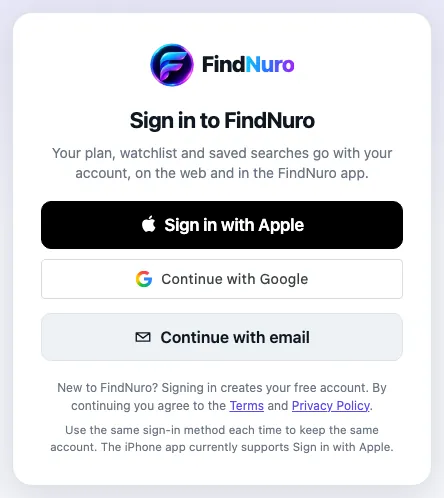
- On the Sign in to FindNuro page, choose one of the options shown:
- Sign in with Apple: uses your Apple Account. You can choose to hide your email address.
- Continue with Google: uses your Google account.
- Continue with email: type your email address and press Send code. Check your inbox for a 6-digit code, type it in and press Verify.
- That's it. FindNuro opens on the Opportunity Finder tab, and your account starts on the Free plan.
About email codes
- The code is valid for 10 minutes and works once.
- You can ask for a new code after about a minute with Resend code.
- Typed the wrong address? Choose Use a different email.
- Can't find the email? Check your spam or promotions folder, then try Resend code.
What you get on the Free plan
The Free plan lets you try Product Research (top 10 results per search), a 10-product watchlist, 3 saved searches and the Profit Calculator. Opportunity Finder, the AI Product Hunter, Compare, Supplier Finder and the Chrome extension need a paid plan. See Choose a plan.
Frequently asked questions
Do I need a credit card to create an account?
No. Signing in creates a free account. You only enter payment details if you choose a paid plan.
Can I change the email address on my account?
Your email comes from the sign-in method you used. Signing in with a different email address creates a separate account. Email contact@shahidllc.us if you need help moving a subscription.
Is FindNuro part of Amazon?
No. FindNuro is an independent research tool. It is not affiliated with, endorsed or sponsored by Amazon.