
AI usage limits and your AI allowance
How daily AI limits, billing-period limits and the AI allowance work, when they reset, and what happens when you reach them.
Video coming soon. The steps below are complete.
Paid plans include AI features. To keep them fast and fair for everyone, each plan has request limits and an AI allowance. You are never charged extra for AI, and your price never changes.
Two kinds of limits
1. AI requests. These are the AI searches advertised with each plan:
| Plan | Per day | Per billing period |
|---|---|---|
| Pro | 30 | 300 |
| Elite | 100 | 1,000 |
| AI Agent Pro | 100 | 1,000 |
AI Product Hunter searches and AI supplier searches count as AI requests. The Opportunity Finder research assistant has its own count per billing period (Pro 20, Elite and AI Agent Pro 200).
2. The AI allowance. One shared allowance covers all AI work on your account: the AI Product Hunter, the research assistant, Supplier Finder AI, and (on AI Agent Pro) the AI Agent. Bigger plans get a bigger allowance. The Account page shows it as a percentage used. Each AI task uses the allowance at exactly what it costs FindNuro, measured from the AI provider's own usage report at the provider's published prices; quick tasks on the economical model use very little of it.
Where to see your usage
- Click Account.
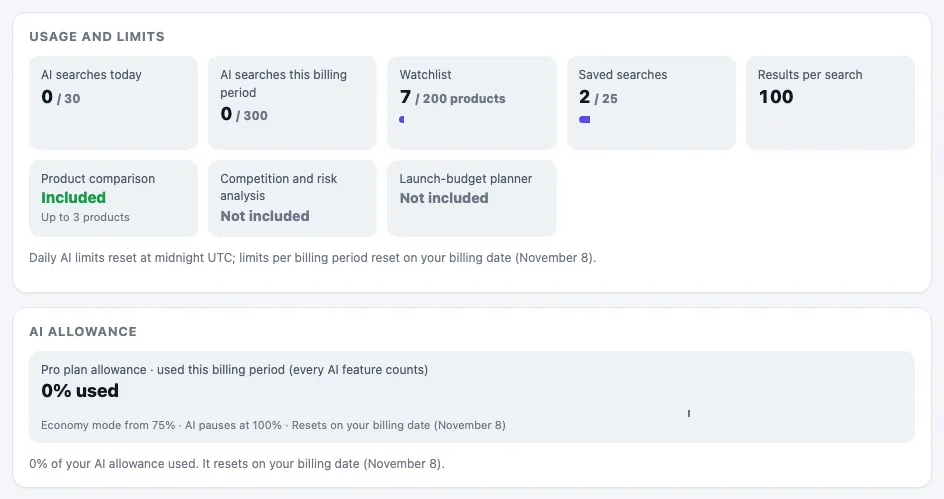
- Usage and limits shows AI searches today and AI searches this billing period.
- The AI allowance card shows how much you have used, for example 42% used, and when it resets.
When limits reset
- Daily limits reset at midnight UTC every day.
- Billing-period limits and the AI allowance reset on your billing date, the day of the month your subscription renews. The card says, for example, Resets on your billing date (November 14).
- If your plan has no billing date (for example complimentary access), they reset on the 1st of each month (UTC).
- If a renewal payment fails, the reset waits until the payment is confirmed.
- If you upgrade in the middle of a period, the new plan's limits apply at once. Your usage so far carries over, so the reset date doesn't move.
What happens as you use the allowance
- Normal: everything works at full quality.
- Economy mode: after a set share of the allowance, FindNuro switches to its economical AI model so the allowance lasts. AI features keep working. On AI Agent Pro, image creation asks you to confirm first, and scheduled automations wait.
- AI paused at 100%: AI features pause until the reset. Everything else in FindNuro keeps working: search, filters, watchlist, compare, the Profit Calculator and your saved data.
The AI Product Hunter and AI supplier searches included in your plan keep working on the economical model up to your plan's request limits, even after the allowance is used.
Messages you may see
- You've reached today's AI limit for your plan. It resets at 00:00 UTC.: wait for the daily reset.
- AI request limit for this billing period reached.: wait for your billing date or upgrade.
- You've used your plan's AI allowance for this billing period. AI features are paused until (date); everything else in FindNuro keeps working. You will not be charged extra.
- AI features are included with Pro, Elite and AI Agent Pro.: you are on the Free plan.
Frequently asked questions
Will I ever be charged for going over?
No. FindNuro never charges extra for AI. When you reach a limit, AI features pause until the reset.
Does a failed AI search use up a request?
No. If the AI service has a problem you'll see The AI service had a problem. You were not charged a search.
Can I buy more AI?
Not separately. Upgrading to a bigger plan gives you higher limits and a bigger allowance straight away.