
Upgrade or downgrade your plan
Upgrade straight away with a prorated charge, or downgrade at the end of your billing period. Includes moving to AI Agent Pro.
Video coming soon. The steps below are complete.
These steps are for card (Stripe) subscriptions on findnuro.com. For Google Play, change plans in the Play Store.
Upgrade (for example Pro to Elite, or to AI Agent Pro)
- Go to Account › Subscription & billing.
- Press Upgrade to (plan).
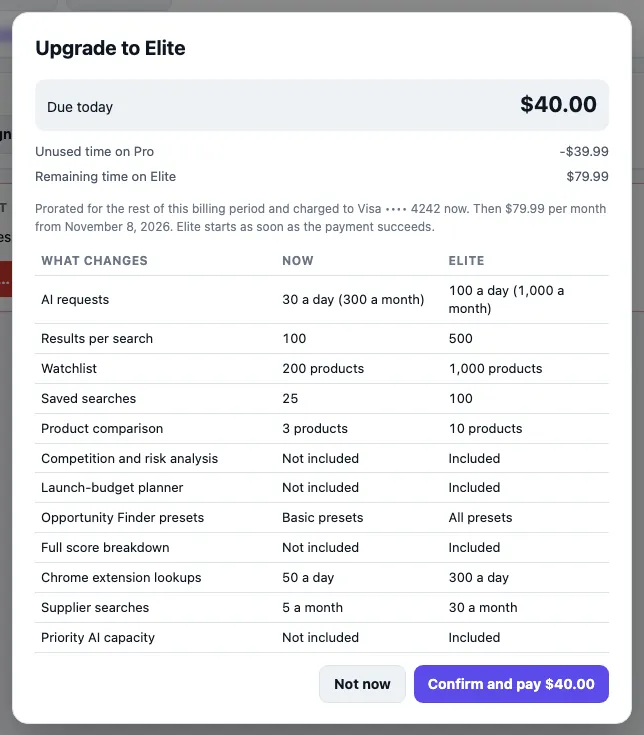
- The dialog shows Due today: a prorated amount for the rest of this billing period, charged to your saved card now. It also shows the new monthly price from your next renewal.
- Press Confirm and pay $X.
- The new plan starts as soon as the payment succeeds.
If your bank asks for confirmation, you'll see Upgrade to (plan) is waiting for payment. You stay on your current plan until it's paid.
Downgrade (for example Elite to Pro)
- Go to Account › Subscription & billing.
- Press Downgrade to (plan).
- The dialog explains that you keep your current plan until the end of the period, then pay the lower price. Nothing is charged or refunded today.
- Press Downgrade on (date).
Changed your mind? Press Keep (plan) (cancel the change) before that date.
On the Free plan?
Use the plan cards under Account › Upgrade. See Choose a plan and subscribe.
Frequently asked questions
Does upgrading reset my AI allowance?
No. The higher plan's limits apply at once, and your reset date stays the same. See AI usage limits.
What changes when I downgrade?
The dialog lists the features that change. Your watchlist and saved searches are kept.