
Connect your Amazon seller account
Authorize FindNuro's AI Agent on Amazon's own Seller Central consent page, one Amazon region at a time.
Video coming soon. The steps below are complete.
Connecting your Amazon seller account lets the AI Agent read your store (listings, inventory, fees) and prepare listings for your approval. You authorize FindNuro on Amazon's own website: FindNuro never asks for your Amazon password.
Before you start
- An active AI Agent Pro subscription, with the AI Agent terms accepted. See Start using the AI Agent.
- An Amazon seller account on the Professional selling plan (Amazon requires it for third-party apps), and permission to authorize apps for it (the primary account user, or a user with that right).
Steps
- In FindNuro, open ✦ AI Agent › Connections.
- Find the Amazon Seller Central (SP-API) card.
- Amazon authorizes each selling region separately. Press the button for the region where you sell:
- Connect Amazon for the Americas (North America and Brazil)
- Connect Amazon for Europe, Middle East, Africa & India
- Connect Amazon for Asia-Pacific (Japan, Australia, Singapore)
- Amazon's Seller Central opens. Sign in to Amazon if asked, review the permissions and confirm.
- Amazon sends you back to FindNuro's Connections page. The region now shows Connected and the marketplaces you sell in.
- Optional: choose a Default Amazon store for the agent, so you don't have to name the marketplace in every request.
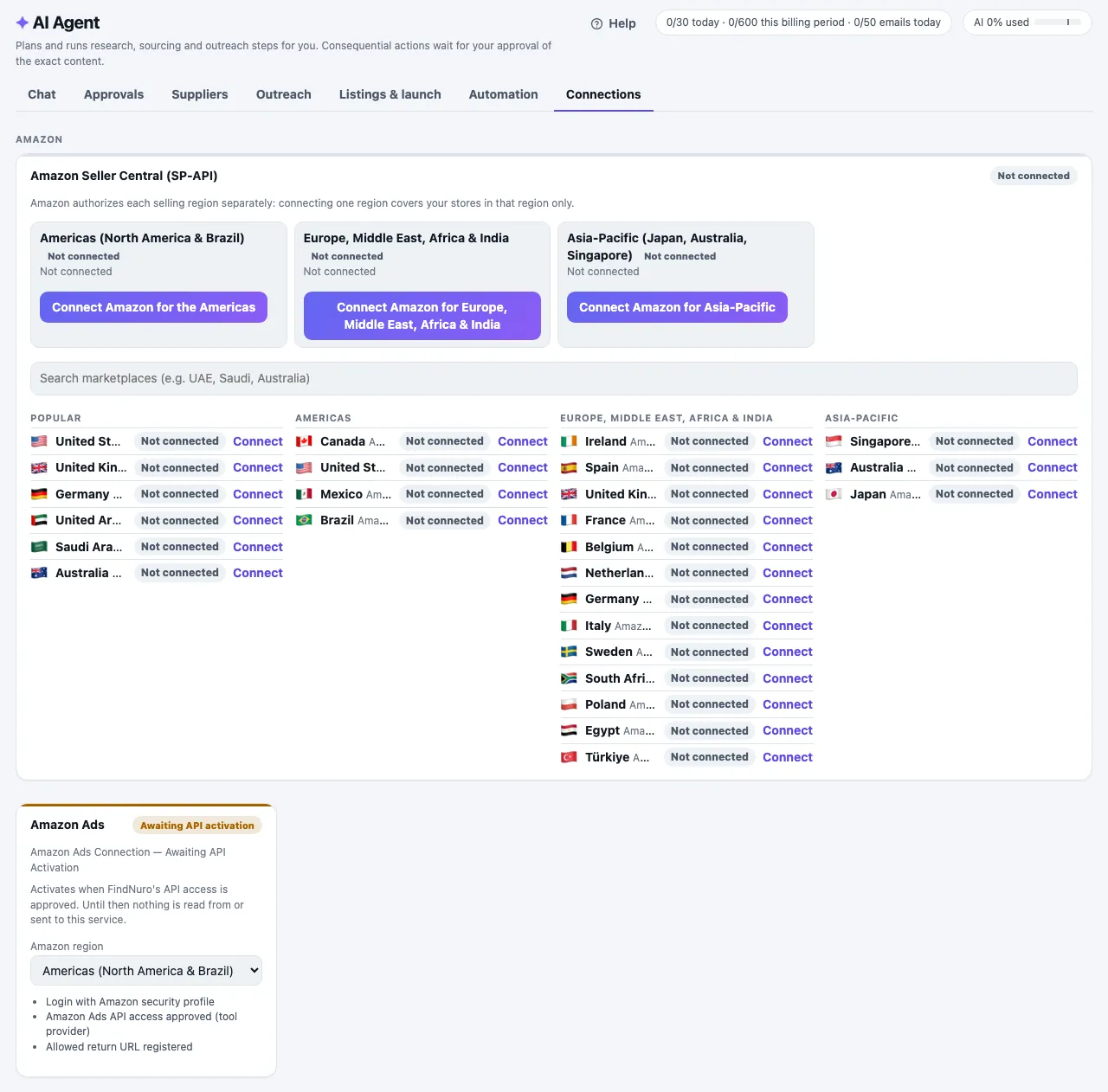
What the marketplace tags mean
- Connected: you sell here and FindNuro can work with this store.
- Suspended listings: Amazon reports suspended listings in this store.
- Not selling here: your account is authorized in the region but doesn't sell in this marketplace.
- Not connected: this marketplace's region isn't connected yet.
- Authorized · unverified: authorized, but Amazon didn't return the list of marketplaces.
Frequently asked questions
Is it safe?
You approve the connection on Amazon's site, and Amazon gives FindNuro a token that you can remove at any time. FindNuro stores it encrypted. Nothing is listed or changed on Amazon without your approval of the exact change. See What FindNuro can access.
After connecting I saw a message like "amazon_sp connected."
That is our short success message for the Amazon Seller Central connection. Your connection worked.
Can Pro or Elite users connect Amazon?
No. The Amazon store connection is part of AI Agent Pro.
Can I start from Amazon's Selling Partner Appstore?
Yes, once FindNuro is listed there. Choose Authorize now on FindNuro's Appstore page. Amazon sends you to FindNuro: sign in (or create your account and choose AI Agent Pro), and FindNuro opens AI Agent › Connections and sends you straight back to Amazon's consent page. Finish within 10 minutes; if the link has expired, start again from the Appstore or use the Connect button in Connections.
Why "limited seats"?
Amazon limits how many sellers can authorize an app while it is in Amazon's beta stage. If you can't connect because seats are full, email contact@shahidllc.us.