
Compare products side by side
Pick products from your watchlist and compare their score, price, estimates, reviews and risk in one table.
Watch the 1:03 video lesson or follow the steps below.
Compare is included with Pro (up to 3 products) and Elite and AI Agent Pro (up to 10).
Steps
- Add the products to your watchlist first (press ☆ Watch on each).
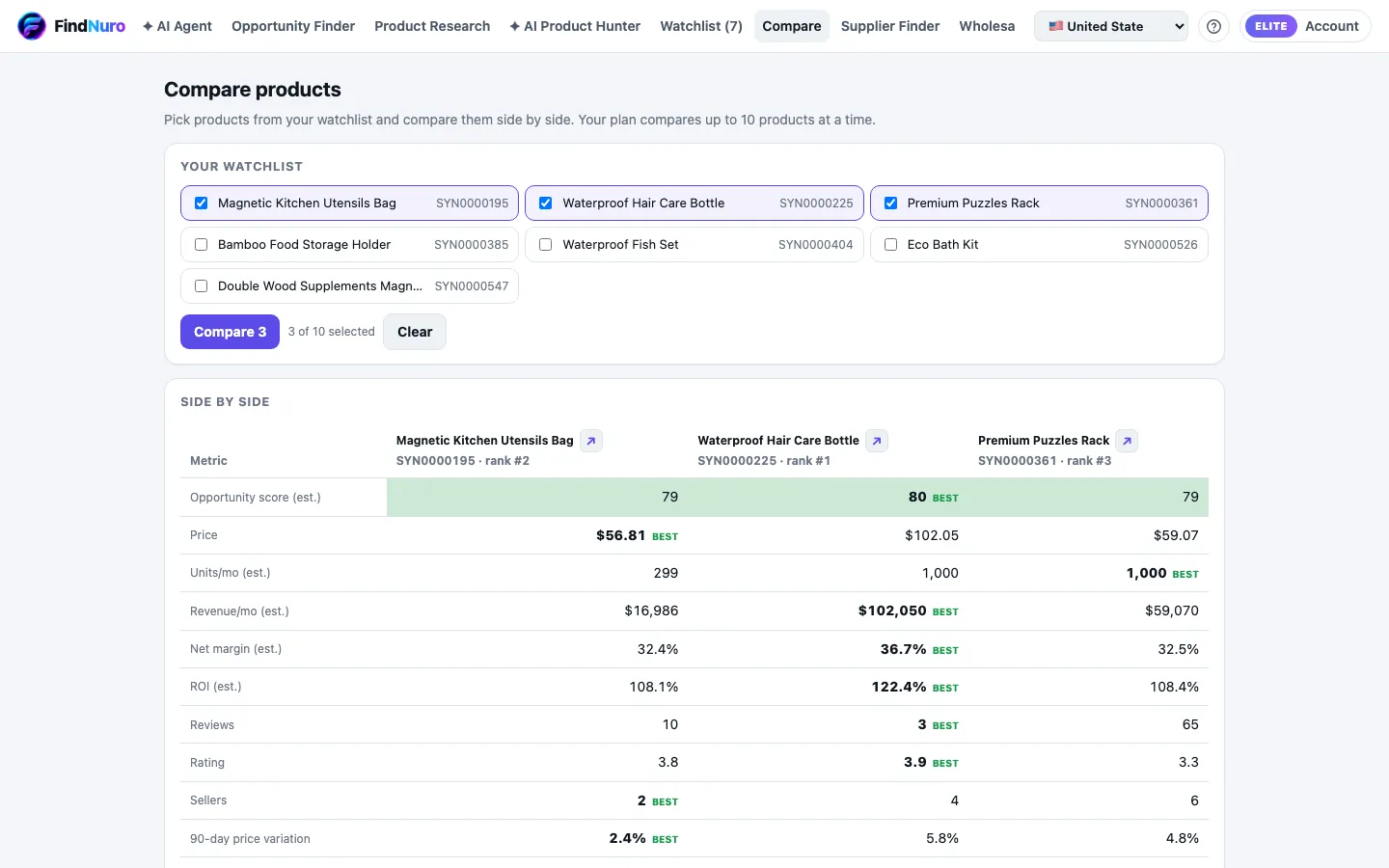
- Open the Compare tab. It says Pick products from your watchlist and compare them side by side.
- Tick the products you want (at least 2).
- Press Compare N.
- Press Clear to start again.
Shortcut: in Opportunity Finder, choose More ▾ › Compare on a row. FindNuro adds it to your watchlist and opens Compare.
What the table shows
Opportunity score (est.), Price, Units/mo (est.), Revenue/mo (est.), Net margin (est.), ROI (est.), Reviews, Rating, Sellers, 90-day price variation and 90-day rank trend. The best value in each row gets a best tag. At the bottom, Metrics won counts the wins for each product and Overall risk summarises its risk. Detailed risk factors are part of Elite.
Frequently asked questions
Compare says my watchlist is empty.
Open a product and choose Watch first. Compare only uses watched products.
Can Free users compare?
No. Comparison is included with Pro (3 products) and Elite (10).