
Work out profit with the Profit Calculator
Enter your selling price and costs to see net profit per unit, margin, ROI, break-even price and a sensitivity grid. Works for FBA and FBM.
Watch the 1:23 video lesson or follow the steps below.
The Profit Calculator is free on every plan. Use it with your real supplier quotes before you commit to a product.
Steps
- Open the Profit Calculator tab (or scroll to Profit calculator for this product in any product's details panel, which fills in the price and fees for you).
- Enter your numbers:
- Selling price ($)
- Supplier unit cost ($)
- Shipping & freight / unit ($) and Prep / unit ($)
- Referral fee (%): Amazon's category referral fee, often 15%
- FBA fulfillment fee ($)
- Storage / unit ($) and Other Amazon fees ($)
- Advertising (% of price) and Returns (% of units)
- Other costs / unit ($)
- Monthly units
- The results update as you type.
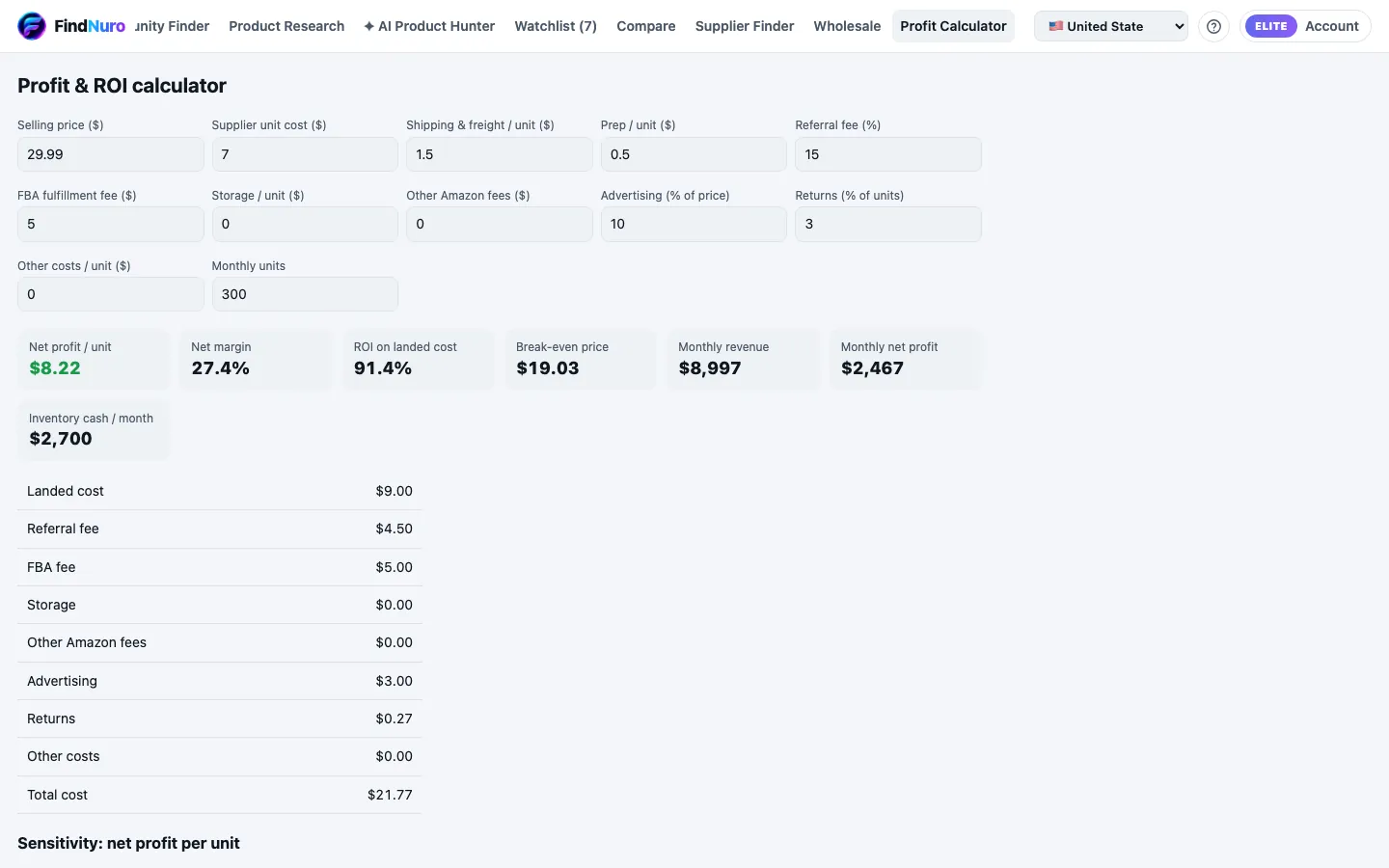
Read the results
- Net profit / unit, Net margin and ROI on landed cost
- Break-even price: the lowest price that doesn't lose money
- Monthly revenue, Monthly net profit and Inventory cash / month
- A full cost breakdown, and a Sensitivity grid showing net profit per unit if the price or the cost moves by up to 20%
FBA or FBM?
The calculator has one fulfilment field, FBA fulfillment fee ($):
- FBA: enter Amazon's FBA fee (the product details panel shows a provider estimate; confirm it in Seller Central).
- FBM (you ship): enter your own cost to pick, pack and ship one order instead, and set Storage to your own storage cost.
Example
You sell at $29.99, the supplier charges $7, freight is $1.50, prep $0.50, referral fee 15%, FBA fee $5, ads 10%, returns 3%. The calculator shows your net profit per unit, margin and ROI. Change the supplier cost to $8 and watch the sensitivity grid to see how much room you have.
Frequently asked questions
Does the calculator include VAT?
For marketplaces with VAT, a note explains how VAT is treated. Enter prices the way the note describes.
What does "Estimated — category not confirmed" mean next to a referral fee?
On Amazon.in (India), FindNuro fills in a missing referral fee from Amazon.in's published fee schedule. When we can confirm the product's fee category, the fee is that category's rate. When we can't, we use the schedule's general row for the product's category family (for example "Kitchen - Other Products") and label the fee Estimated — category not confirmed. The final Amazon referral fee may differ.
Profit, margin, ROI and break-even built on that fee carry a fee est. marker. CSV exports and AI Agent answers say the same. If no official category or general row fits, the fee shows as Fee unavailable and no profit is shown; nothing is guessed. Check the fee in your Seller Central fee preview, or type your own referral % into the calculator.
Does the calculator include Amazon.in's closing fee?
Yes, for Amazon.in (India) products. In the product's details panel the calculator shows an Amazon.in closing fee field, set by Amazon.in's published fee schedule for the product's fee category and the price you enter:
- Rs 0–300 and Rs 301–500: the amount for the product's fee category group (Rs 14–27);
- Rs 501–1000: Rs 30;
- above Rs 1000: Rs 55 (Rs 75 for a few appliance and home-entertainment categories).
Change the selling price and the closing fee, and the referral fee, move to that price's band. If you type your own referral %, the calculator keeps it, and the closing fee still follows the price. Amazon adds 18% GST to its fees, the closing fee included. With the panel's starting numbers, the calculator shows the same profit, margin and ROI as the product's details.
When the referral fee comes from our data provider, the calculator keeps that referral fee and adds the closing fee from the schedule.
If the referral fee comes from our data provider but we can't match the product's category, the calculator uses the closing fee Amazon.in charges almost every category: Rs 30 from Rs 501 to 1,000 and Rs 55 above Rs 1,000. It is marked Estimated — category not confirmed. We don't do this at Rs 500 or less, where the fee depends on the category, or for products that could be large appliances, chimneys, refrigerators or home entertainment, where Amazon charges more.
Otherwise, if the product's category matches no row of the schedule, or the schedule has no closing fee for its category at that price (some categories at Rs 500 or less), the calculator shows Fee unavailable and no profit. When we can only match the product's category family, not its exact category, the closing fee is marked Estimated — category not confirmed and the profit carries fee est.. Use Other Amazon fees, besides the closing fee for any other Amazon fee.
The same rule applies everywhere FindNuro shows an Amazon.in profit: the AI Agent's profit, factory and ads answers, Supplier Finder, Find on Alibaba and the Chrome extension's Quick profit. Each one includes the closing fee for the price it uses and finds the break-even price with each price band's own fees. If the closing fee is unknown, it says Fee unavailable instead of showing a profit. If you know the closing fee, give it to the AI Agent and it will use yours.
Is what I type saved?
Calculator inputs are used to calculate your results. See the Privacy Policy for details.