
Save products and searches: Watchlist
Watch products to track them, keep saved searches, and understand watchlist limits per plan and per marketplace.
Watch the 1:03 video lesson or follow the steps below.
Your Watchlist keeps the products you want to follow. FindNuro refreshes watched products more often than others.
Watch a product
- In a product's details panel, press ☆ Watch. It changes to ★ Watching.
- In Opportunity Finder, open More ▾ on a row and choose ☆ Watch.
- In the Chrome extension, press Save on an Amazon product page.
To stop watching, press ★ Watching again.
Open your watchlist
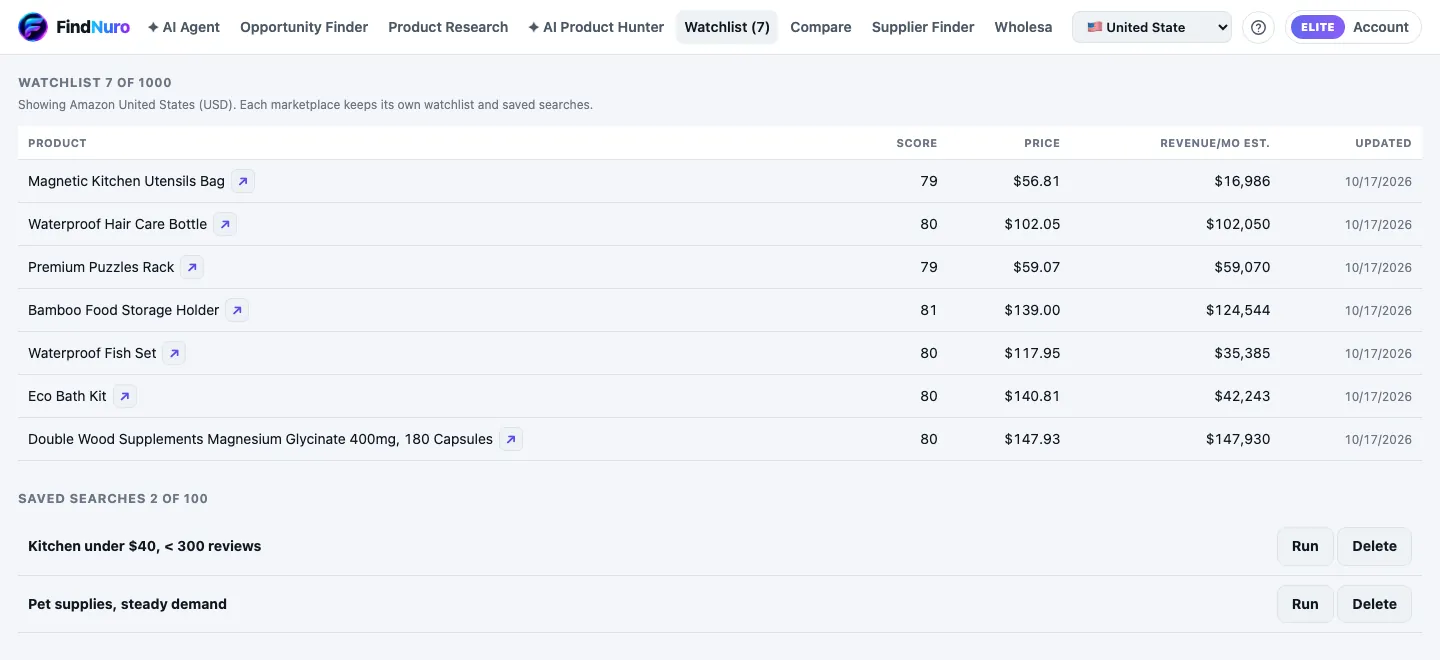
Click the Watchlist (N) tab. You'll see each product's score, price, estimated monthly revenue and when it was last Updated. Click a product to open its details.
Saved searches
Saved searches appear on the same tab. Press Run to repeat a search with today's data, or Delete to remove it.
Limits
| Plan | Watchlist | Saved searches |
|---|---|---|
| Free | 10 | 3 |
| Pro | 200 | 25 |
| Elite and AI Agent Pro | 1,000 | 100 |
If you reach the limit you'll see Your plan allows N watchlist items. Remove some products or upgrade.
Frequently asked questions
Is my watchlist the same on the web, Android and the extension?
Yes. It belongs to your FindNuro account, as long as you sign in with the same method everywhere.
Will I lose my watchlist if I cancel?
No. When you move to the Free plan, your watchlist and saved searches are kept.