
Read a product's details: demand and competition
Understand the details panel: key numbers, the opportunity score breakdown, price and rank history, risk analysis and the launch planner.
Watch the 1:39 video lesson or follow the steps below.
Click any product in Opportunity Finder, Product Research, your Watchlist or the AI Product Hunter to open its details panel.
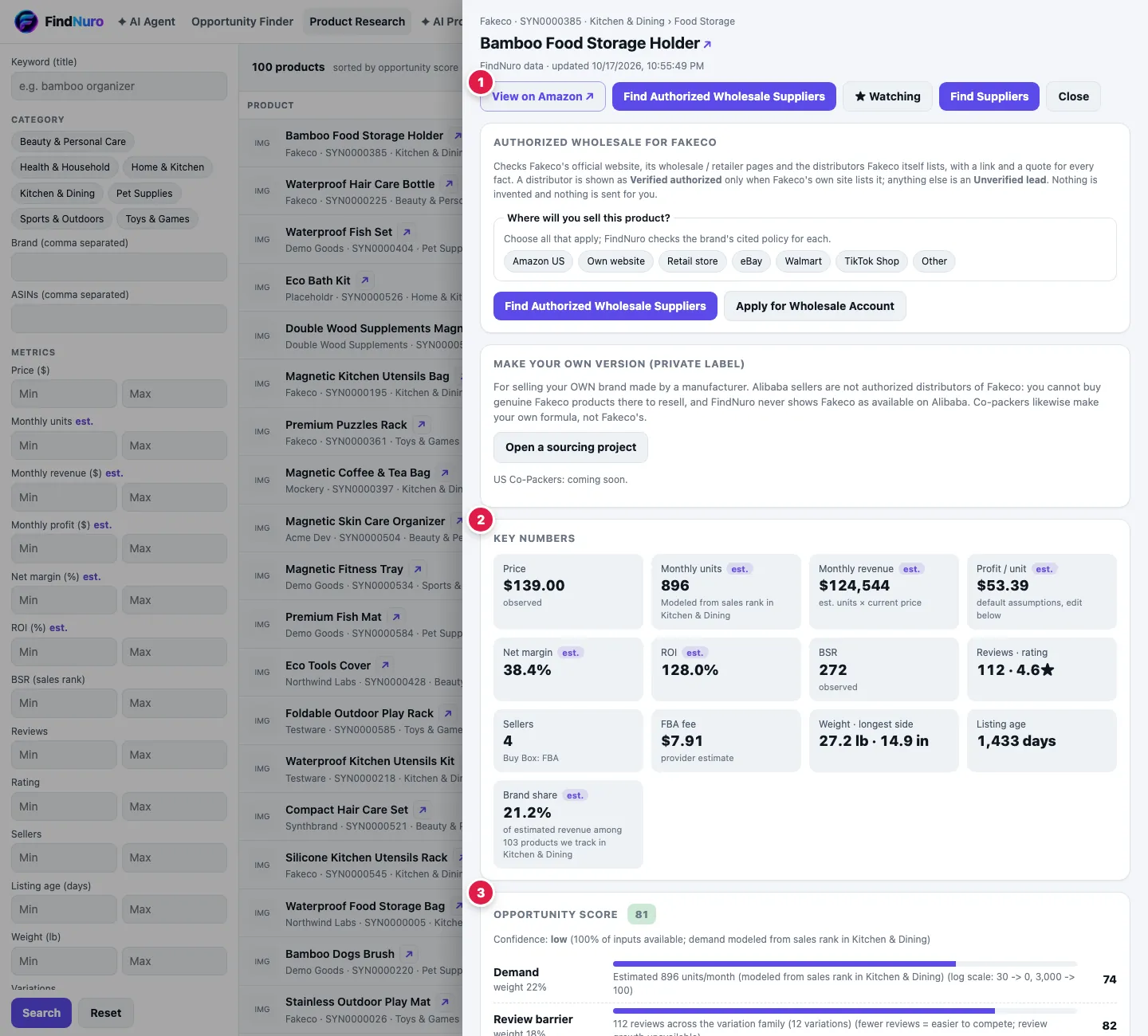
The top of the panel
The header shows the brand, ASIN and category, and FindNuro data · updated (date and time) so you always know how fresh the numbers are.
Buttons:
- View on Amazon ↗: opens the product page on Amazon in a new tab.
- Find Authorized Wholesale Suppliers (a brand that several sellers offer, Pro, Elite and AI Agent Pro): checks the brand's official wholesale program, sales-channel policy and authorized distributors. See Find authorized wholesale suppliers.
- ☆ Watch / ★ Watching: add to or remove from your watchlist.
- Find Suppliers: open or start a Supplier Finder project for this product (every product). See Supplier Finder.
- Close: go back to your list.
Sourcing: resell the brand or make your own
Below the header, FindNuro shows the sourcing path that fits the listing:
- A brand that several sellers offer: the Authorized wholesale for the brand card (choose where you'll sell, then research), and below it Make your own version (private label) with Open a sourcing project.
- Not enough listing data to tell (for example Amazon is the only seller, or the brand dominates its niche): How do you want to source this product? shows Resell this brand (authorized wholesale) and Make your own version (private label: Alibaba / China suppliers) side by side. You choose.
- Unbranded, or one seller of its own brand: private-label sourcing leads (Find Suppliers). If the product has a brand name, Resell genuine … instead? Check authorized wholesale is a small link below the header.
Supplier directories such as Alibaba.com are manufacturers and traders, not authorized distributors of other companies' brands. FindNuro never shows a brand's products as available on Alibaba.
Key numbers: demand
- Monthly units (est.): how many units the product probably sells per month. Monthly units (minimum) means the number comes from Amazon's "bought in past month" badge, which is a floor.
- Monthly revenue (est.): estimated units × current price.
- BSR: the Best Sellers Rank. Lower means more sales.
- Sales rank history chart: is demand steady, seasonal or changing?
Key numbers: competition
- Reviews · rating: how hard it may be for a new listing to compete.
- Sellers: how many sellers offer the product.
- Brand share (est.): how much of the niche one brand holds.
- Listing age: how long the product has been on Amazon.
Profit numbers
Profit / unit, Net margin and ROI are estimates using default assumptions (unit cost = 25% of price, plus freight, advertising and returns). Change them in Profit calculator for this product at the bottom of the panel to use your own costs. The FBA fee is a provider estimate.
Opportunity score
The score card shows the score, a Confidence level and bars for each component: demand, review barrier, estimated margin, seller crowding, price stability, sales-rank trend and product risk. How we calculate this links to our methods page. If a product isn't scored, the panel explains which data is missing.
Elite tools
- Competition and risk analysis: press Run risk analysis to see the overall risk and a list of risk factors. These are research checks computed from FindNuro's stored data, not a prediction.
- Launch-budget planner: enter your total budget, supplier cost, inbound shipping, advertising share, cash reserve and sell-through target, then press Build launch plan. FindNuro shows how many units to order and how to split the budget between inventory, launch ads and a reserve.
On other plans these cards say the feature is included with Elite.
Frequently asked questions
Are these Amazon's numbers?
Price, rank, reviews and sellers are observed marketplace data. Sales, revenue, profit, margin, ROI and the score are FindNuro estimates, never Amazon-verified. See Estimates vs observed data.
Why is a value "Unavailable"?
FindNuro doesn't have that value for this product yet. It never guesses a missing number.