
Find authorized wholesale suppliers for a brand
Check a brand's official wholesale program, its sales-channel policy and its authorized distributors, each with a source, then draft an honest outreach email or start an application.
Watch the 2:46 video lesson or follow the steps below.
Use Find Authorized Wholesale Suppliers when you want to resell another company's brand, such as a supplement or a water bottle brand. FindNuro checks the brand's official website, its wholesale or reseller pages and the distributors the brand itself lists. Every fact comes with a link, and a quote where there is one.
It's included with Pro, Elite and AI Agent Pro. Free accounts see a message that the research is included with those plans.
Step 1: Open a branded product
Open the product's details panel, for example from Opportunity Finder's Wholesale (partial data) preset. What you see depends on the listing:
- A brand that several sellers offer (or any product opened from the Wholesale preset): the header has Find Authorized Wholesale Suppliers, and the panel shows a card called Authorized wholesale for the brand.
- Not enough listing data to tell (for example Amazon is the only seller): a card How do you want to source this product? shows both paths. Use Find Authorized Wholesale Suppliers under Resell this brand (authorized wholesale).
- One seller of its own brand: FindNuro leads with private-label sourcing. To research the brand anyway, press Check authorized wholesale next to Resell genuine … instead?
In Opportunity Finder you can also press Find Authorized Wholesale Suppliers (or Authorized wholesale) on a product row. That opens the Wholesale tab.
Step 2: Choose where you will sell
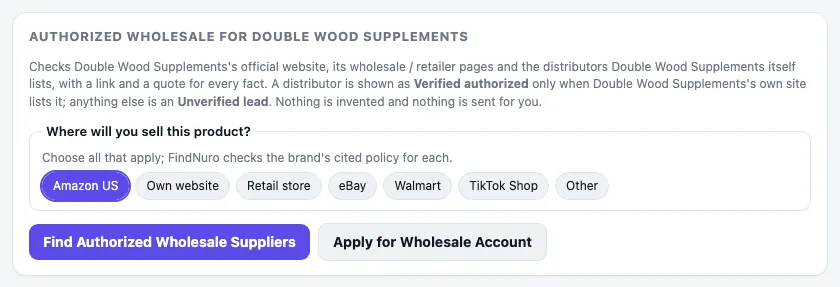
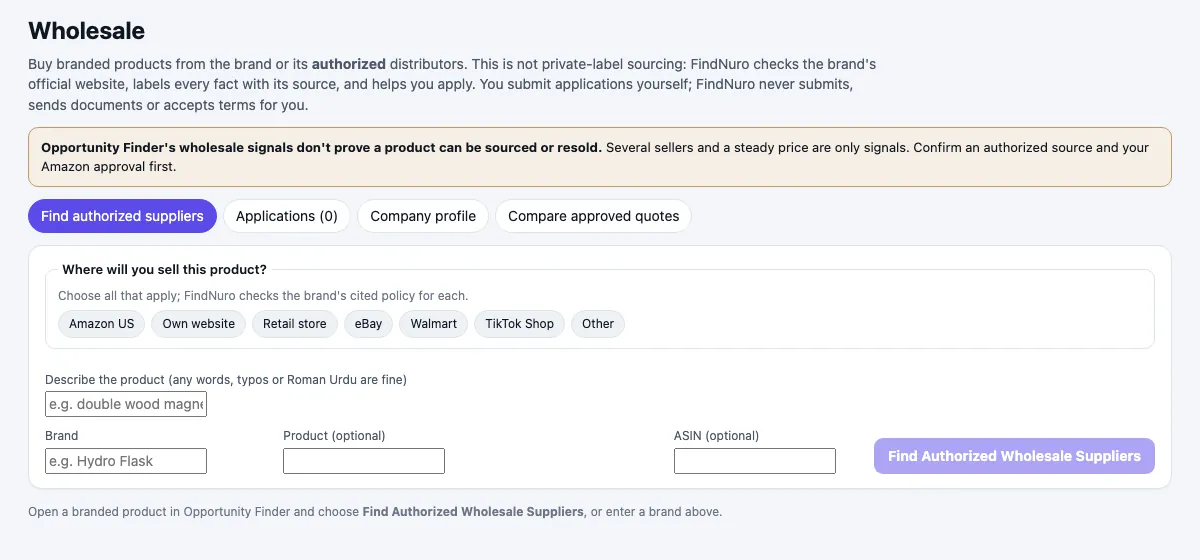
Under Where will you sell this product?, press every channel you plan to use: Amazon US, Own website, Retail store, eBay, Walmart, TikTok Shop or Other. FindNuro checks the brand's cited policy for each one. You can change your choice after the research, and it is saved with that research.
Step 3: Run the research
Press Find Authorized Wholesale Suppliers, in the panel's header or in the card. The research can take up to a minute.
- Each research run uses part of your AI allowance. You can run up to 5 a day; the count resets at 00:00 UTC.
- A run that fails, or can't identify the brand, isn't charged and doesn't count.
- If the brand was researched in the last 7 days, FindNuro shows the saved result (marked saved result, refreshed weekly) at no extra cost.
Step 4: Check the brand's sales-channel policy
If the brand's cited policy prohibits a channel, a red banner appears at the top of the result, with the brand's own words and a link to the page. For a channel you chose, the banner says you chose that channel and adds: Don't buy the brand wholesale to sell on that channel unless the brand authorizes it in writing.
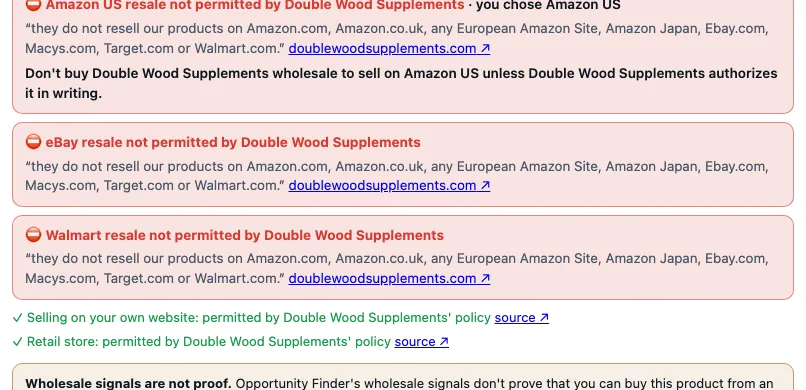
- Red: the brand's own website says resale on that channel is not permitted.
- Amber: a third-party page says so; the brand hasn't confirmed it.
- Green ✓ lines: channels the brand's policy permits, with a source ↗ link.
Step 5: Read the result
The result opens with a summary: Authorized route found, Partial information, No authorized supplier found or Supplier data unavailable.
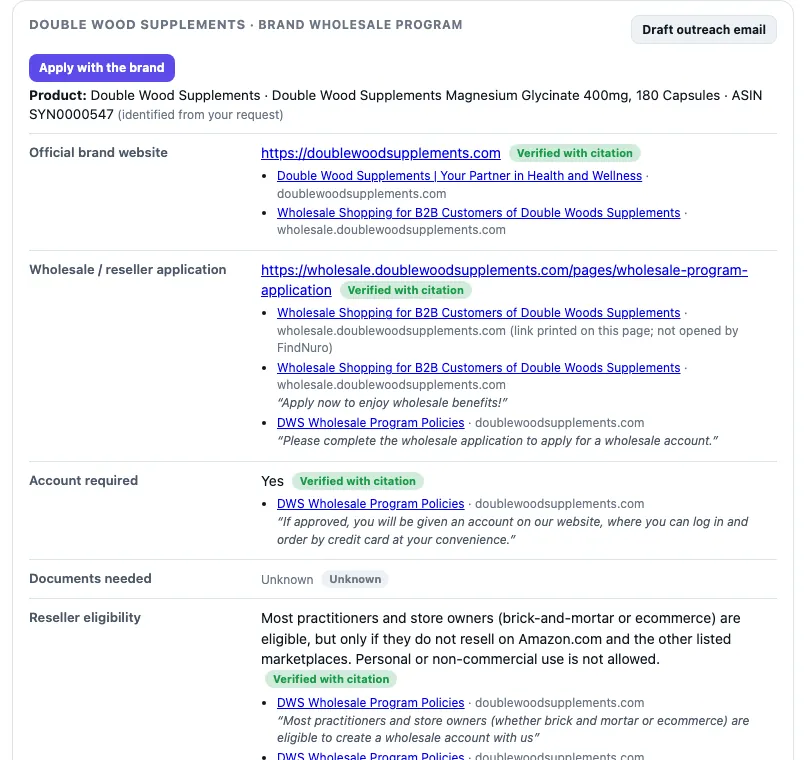
The brand wholesale program card lists what FindNuro could check: Official brand website, Wholesale / reseller application, Account required, Documents needed, Reseller eligibility, Restrictions, MOQ (published), Wholesale pricing (published), Contact page and Public business contacts. Each row has a label:
| Label | Meaning |
|---|---|
| Verified with citation | A quote on the brand's own website, linked below the row. |
| Supplier claim | What a supplier or another website says. The brand's website doesn't confirm it. |
| Unknown | Not found in any source FindNuro could check. FindNuro never guesses MOQ, prices or authorizations. |
The Amazon resale authorization (brand gating) row is Unknown until you check it. If you've connected your Amazon seller account in the AI Agent, press Check with my Amazon account.
Under Distributors, each company is either Verified authorized (the brand's own website lists it) or an Unverified lead (confirm it with the brand before you buy). A note confirms the brand is Not available on Alibaba: Alibaba is only for making your own version (private label).
When the data is incomplete, Research it yourself lists the steps to confirm a source before you buy.
Step 6: Draft an outreach email
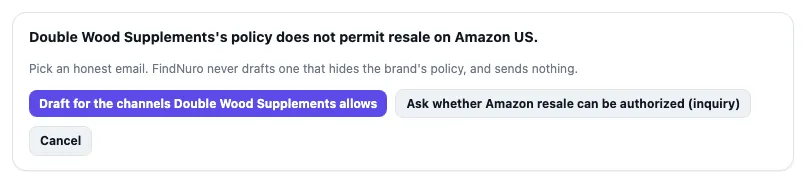
Press Draft outreach email on the brand's card or on a distributor. If one of your chosen channels is prohibited by the brand's policy, FindNuro asks you to pick an honest email first:
- Draft for the channels the brand allows: asks to open an account for the channels the policy permits, and says you won't list the products where they're not permitted.
- Ask whether Amazon resale can be authorized (inquiry): asks the brand whether Amazon resale can be authorized for you (shown when Amazon US is prohibited).
The draft opens with To, Subject and Body you can edit. Fill in the [fill in] parts, then press Copy email or Open in your email app and send it yourself. FindNuro hasn't sent anything and never sends it for you.
Step 7: Ask a follow-up or apply
- Ask a follow-up about the brand: type a question, for example Do I need a resale certificate? Answers use only this research and its sources. Each answer uses a small part of your AI allowance; failed answers aren't charged.
- Apply with the brand (or Apply for Wholesale Account on a distributor) starts an application in the Wholesale tab.
The Wholesale tab
The Wholesale tab has four parts:
- Find authorized suppliers: search by Brand, Product (optional), ASIN (optional) or a description in your own words, choose where you'll sell, and press Find Authorized Wholesale Suppliers.
- Applications: for each application, Open application ↗ (you fill in and submit it on the supplier's own site), Draft from my company profile (answers and an introduction email), upload documents (PDF, JPEG or PNG up to 10 MB, encrypted, only you can open them), record the supplier's quote and track the status.
- Company profile: the details applications usually ask for. FindNuro never stores tax ID numbers, SSNs, bank or card details.
- Compare approved quotes: quotes from accounts you've marked approved, side by side.
Frequently asked questions
Does a red banner mean I can never sell the brand on Amazon?
It means the brand's own published policy doesn't permit it. Only the brand can authorize you, in writing. Use the inquiry email to ask.
Is a "Verified authorized" distributor safe to buy from?
It means the brand's own website lists that distributor. You still need your own account approval, invoices, and approval from Amazon if the brand is gated there.
Why can't I find this brand on Alibaba in FindNuro?
Alibaba.com sellers aren't authorized distributors of other companies' brands. FindNuro never shows a brand's products as available from Alibaba. Use Alibaba only to make your own version.
What if the research finds nothing?
You'll see No authorized supplier found or Partial information and the Research it yourself steps. A run that couldn't identify the brand isn't charged.